Project 01 · In progress
Home SIEM lab
A virtualised Windows domain, with a Windows Server 2022 Core domain controller and a Windows 11 Enterprise client, sending Sysmon telemetry to Wazuh. Documented runbooks and incident reports with step by step build guides.
- Role
- Solo build
- Stack
- wazuh, sysmon, windows server 2022, active directory
- Status
- In progress
- Access
- Setup Books, Runbooks, Detections
Components
Domain controller
Windows Server 2022 Core
Runs Active Directory for the lab domain.
Endpoint
Windows 11 Enterprise
Domain-joined client running Sysmon and the Wazuh agent.
SIEM
Wazuh
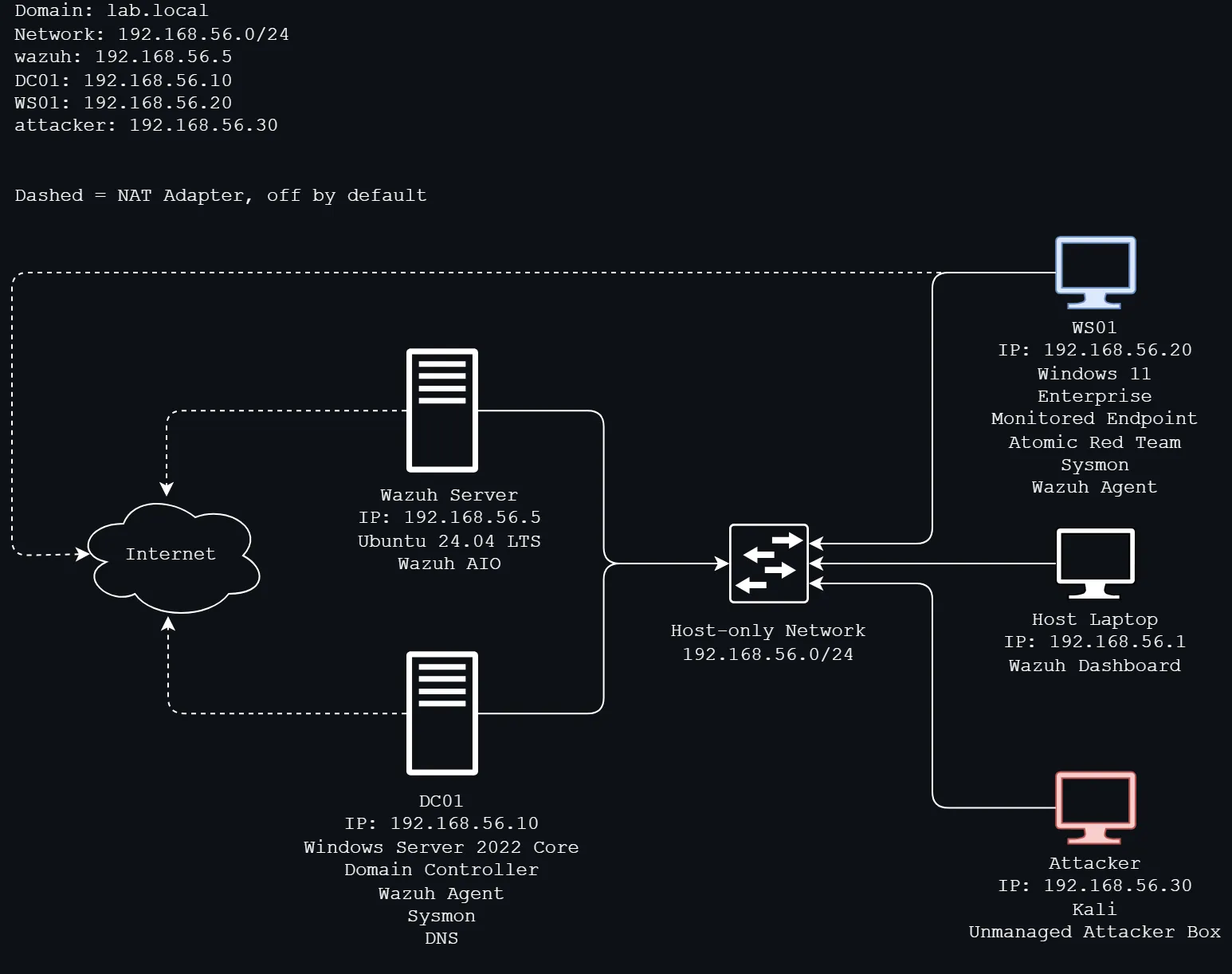
AIO runs on a Ubuntu server and collects various endpoint data and logs.
Planned
Attacker VM
Generates activity for the SIEM to detect.
Why
I built this project to get hands-on practice with SIEM, in particular building and triaging alerts against a domain controller. My main goal is to learn what AD attacks look like in Windows and Sysmon telemetry. I’ll be using Atomic Red Team to test and detect MITRE ATT&CK techniques, later on I’ll be using an unmanaged attacker box. I also want to get better at writing my own detection and runbooks.
Network Topology
Detections
Incidents worked through in the lab, mapped to MITRE ATT&CK
Runbooks
Attack walkthroughs and how to respond
Setup guides
Step-by-step build of the lab
Host Prep
Get the device ready to run the VMs
Networking
Set up an isolated network before creating any of the VMs
Wazuh server
Setup the SIEM (Manager + Indexer + Dashboard, AIO)
AD Domain (DC & Client)
Setup a domain controller with one domain joined client
Installing Sysmon on WS01
Installing sysmon will give us useful endpoint telemtry, we will repeat this process on DC01 later on.
Wazuh agent on WS01
Setup the agent on WS01 so we can get the client's telemtry, including Sysmon events.
Install Sysmon and the Wazuh agent on the domain controller
Certain attacks will be invisible on the endpoint (WS01) and only show up on the DC. As such, getting telemetry from the DC is especially important when we start using the unmanaged attacker box.
Atomic Red Team on WS01
Generate adversary behaviour on WS01 and build our detections.